From Ledgers to Dashboards: A Brief History of Business Records
Business records have changed from handwritten ledgers to dashboards. Learn how to keep each format clear, traceable and useful for decisions.
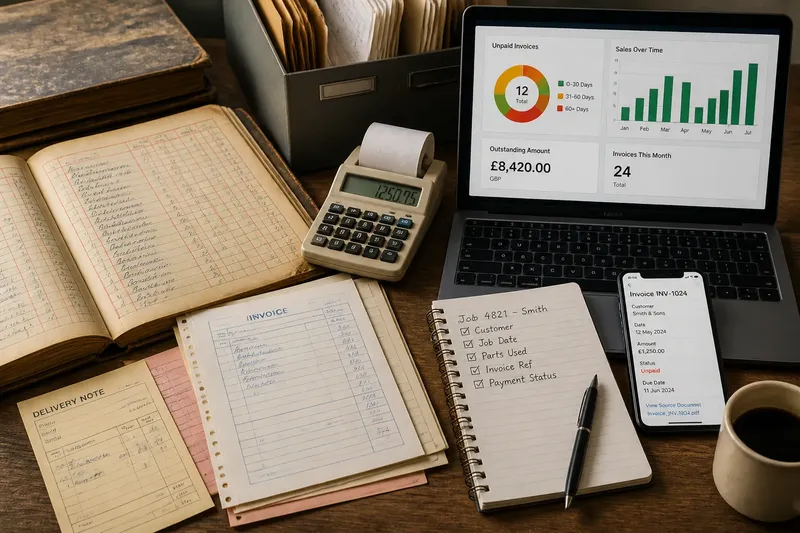
The common mistake with business records is treating each new format as a better answer by itself. A dashboard can look clearer than a ledger while hiding what was entered, when it changed or what a figure means. The cost is confusion dressed up as visibility. From handwritten books to digital dashboards, useful records still need to help someone understand activity and make a sound decision.
Follow a record from its first purpose to its current form. The aim is not to recreate an old bookkeeping system, but to see what each format made visible, what it left awkward and how to choose records that fit the work you need to understand.
Start with the entry
A business record begins when an event is written down: goods arrive, a sale is made, a payment is due or stock is moved. In a handwritten ledger, someone entered the event in a book, often under an account heading. The page gave the entry a place and a neighbour. A reader could follow related entries, compare them and trace a balance back through the book.
The ledger’s strength was continuity. It collected activity in a durable sequence, often with conventions that made additions and corrections visible. Its limits were practical: searching across many pages took time, sharing one book could be awkward, and a mistake might require careful correction rather than a clean edit.
Before adopting any format, decide what one entry must tell you. A useful record commonly identifies the date, activity, amount or quantity where relevant, party involved and source document. A sales entry might point to an invoice; a stock entry might identify a delivery note. Without enough context, a tidy row is still hard to interpret.
Follow changing formats
As businesses grew, records spread beyond one handwritten book. Separate books and forms organised cash, purchases, sales, stock and correspondence around particular tasks. Paper forms helped different people capture the same kinds of details, while filing systems gave documents a retrievable home. Records became a set of connected tools rather than a single volume.
Adding machines and later office equipment helped with repeated calculations and copying. Typewritten forms improved legibility; carbon copies let a transaction leave a trace with more than one person. These formats did not interpret the activity. People still had to decide which details mattered, check that records agreed and explain a total to someone who had not handled the original document.
Computerised spreadsheets changed how people worked with records. Rows and columns could be sorted, filtered and recalculated, making it easier to inspect a period or category. Accounting software added structured workflows for invoices, payments and accounts. The benefit depended on disciplined entry: a wrong category or duplicated transaction could travel through the system just as readily as a correct one.
Dashboards sit at the visible end of this progression. They gather selected information into charts, totals or status indicators, often drawing from underlying software. A dashboard can make a pattern easier to notice, but it is a view of records, not a replacement for them. When a number looks surprising, the reader should be able to trace it to the underlying entries and understand the rules used to group them.
Keep activity legible
Legibility is more than neat handwriting or attractive charts. A record is legible when another person can tell what happened, where the information came from, how it was classified and what remains uncertain. That takes consistent names and categories, clear dates, accessible source documents and a visible way to correct errors.
Imagine a small repair shop that records each job in a spreadsheet. The owner enters the customer, job date, parts used, invoice reference and payment status, then uses a dashboard to view unpaid invoices. If a payment appears outstanding, the owner checks the invoice reference against the source record instead of treating the dashboard’s colour as the whole story. The format helps because it preserves a route from summary back to source.
When choosing a record system, work through the task in order:
- Name the decision. Check whether you need to know which invoices need attention or which stock items require reordering. If the decision is clear, choose a format that answers it; if it is not, clarify the question before building a report.
- Identify the source. Check which document or event supports each entry, such as an invoice, receipt, delivery note or signed job sheet. If there is a source, link or file it with the entry; if there is none, resolve how the activity will be evidenced before relying on the record.
- Set consistent fields. Check that dates, customer names, categories and statuses use stable labels. If similar activity can be compared, keep those fields; if names or categories vary, standardise them before using totals.
- Choose a suitable format. Check whether the task needs a paper log, sortable list or linked workflow. If a simple shared task is involved, a paper log may suffice; if sorting is needed, use a spreadsheet; if invoices and payments must link, consider accounting software.
- Make corrections traceable. Check whether a reviewer can see what changed and why. If the system provides correction history, use it; if not, add a dated explanatory note rather than silently replacing information.
- Check the route to detail. Check whether a total or status can be followed back to its entries and supporting documents. If it can, keep the link available; if it cannot, improve the record trail before relying on the summary.
For accounts, tax and regulated records, follow the relevant product instructions and local requirements. Ask a qualified accountant or other appropriate professional when the rules affect your decisions.
Choose the right view
Is a spreadsheet enough?
A spreadsheet may suit a straightforward list when one person or a small team can maintain consistent entries. Consider a dedicated system if you need linked records, controlled access, reliable change history or recurring accounting workflows.
What belongs on a dashboard?
Include only measures that help someone decide what to do next, and make their meaning clear with a date range, category and source. Leave detailed transaction information in the underlying record rather than squeezing it into a crowded display.
How should records handle corrections?
Make the original entry and the correction understandable to someone reviewing them later. Use the software’s audit history or a dated note that explains the change, rather than silently replacing information that could matter.
When should a paper record stay?
Keep paper when it is the natural source of evidence or part of a process that depends on a physical signature, delivery note or receipt. Store it so the related digital entry can point back to it, and avoid creating a second version that nobody is responsible for keeping current.
Skip decorative reporting
It is rarely worth building a polished dashboard before the underlying entries are consistent. Nor does every activity need a chart: a simple, searchable list may answer the question more directly. Put effort into clear categories, sensible access and retrievable source records before adjusting colours or adding visual flourishes.
Records also need an owner. Decide who enters information, who checks exceptions and who can correct a mistake. If responsibility is vague, even a well-designed tool can become a pile of conflicting versions. Keep the process proportionate to the business, and remove fields nobody uses rather than making every entry burdensome.
Business record-keeping has changed its surfaces, from ledger pages to software screens, while retaining one practical purpose: making activity understandable to the people responsible for it. When you compare formats, ask whether a reader can follow an event from source to entry to useful view. That test matters more than whether the latest display looks impressive.